
WordPress SEO automation on autopilot
WordPress SEO automation means software runs the work an SEO team would: finding the queries your customers search with, writing and optimizing articles, publishing them on a schedule, and tracking the results. Seonix does exactly that for WordPress sites — it researches keywords with real demand, generates optimized articles, and publishes them as native posts through its free plugin, listed on WordPress.org.
You connect a site once, approve the content plan, and choose how much control to keep: review every draft inside Seonix, or let the autopilot publish on the cadence you set. Everything below is what actually ships today — no roadmap promises.
What Seonix runs on your WordPress site
One connected site gets the full loop — the same four stages an in-house SEO process would run, executed continuously.
- 01
Research
Seonix crawls your site and builds a business profile — what you sell, who you serve, how you sound. It then researches queries with real search demand, clusters them into topics, and lays them out on a publishing calendar you can edit.
- 02
Write and optimize
Each article is generated against your project profile with on-page SEO applied at creation time: optimized title, meta description, headings, internal links, images, and schema markup. Content generation works in 50+ languages.
- 03
Publish on schedule
Articles land in WordPress as native posts through the Seonix plugin — with the featured image, category, slug, excerpt, and SEO meta already set. Publishing is idempotent: re-publishing updates the existing post instead of creating a duplicate.
- 04
Track and refresh
Seonix follows rankings and traffic per published page and checks where your brand appears in AI answers. The calendar mixes new articles with refreshes of existing ones, so winners get stronger instead of decaying.
How to connect WordPress to Seonix
The one-click flow takes a few minutes and never asks for your WordPress password — the plugin generates its own API key and exchanges it securely.
Prefer manual setup? On activation the plugin generates an API key (it starts with sx_). Copy it from Seonix → Settings in your WordPress admin and paste it into Channels → WordPress in the Seonix dashboard — Seonix verifies the connection immediately.
- 1
Install the free Seonix plugin
In your WordPress admin, go to Plugins → Add New, search for "Seonix", click Install Now, then Activate. The plugin is listed in the official WordPress.org catalog.
- 2
Click "Connect to Seonix"
Open the Seonix menu in your WordPress admin and click "Connect to Seonix". Your browser opens the Seonix app; sign in or create an account on the spot.
- 3
Pick the project to link
Choose an existing Seonix project or create a new one — the connection completes automatically, with no key to copy.
- 4
Seonix scans your site right away
A free site scan starts on connect. Results land in Site Health within minutes, and the keyword plan builds from there.
What the autopilot delivers
Auto-publishing has two modes, set per project. In draft mode Seonix plans and writes on schedule, and every article waits for your approval inside Seonix before it goes to WordPress. In auto mode approved-plan articles publish themselves at the scheduled time. The free plan covers the technical site audit; publishing automation is part of paid plans, starting with Starter at $49/month instead of $100 — 51% off, or $470 a year instead of $1,200.
- Up to 30 published articles per month on the Starter plan
- Publishing cadence from daily to weekly — you set the rhythm
- A visual content calendar you can edit before anything ships
- New articles mixed with refreshes of existing posts
- Email when an article is published; Telegram alerts can also announce drafts ready for review
Why WordPress gets the deepest integration
WordPress is the only platform where Seonix ships a full plugin, not just a publishing connector. The plugin works on your site's side: it serves AI-search files, pings search engines about changes, brings your audit into wp-admin, and applies fixes — so the site itself gets more visible, not only its new articles.
llms.txt for AI search, from activation
The plugin serves /llms.txt and /llms-full.txt — a machine-readable index of your published content that AI assistants use to discover and cite pages. Generated live, always in sync, free, and no Seonix account required.
IndexNow pings on every publish
Publishing or updating a post pings IndexNow, so participating search engines — Bing, Yandex, Seznam, Naver — learn about the change within minutes instead of waiting for the next crawl. Works without an account too.
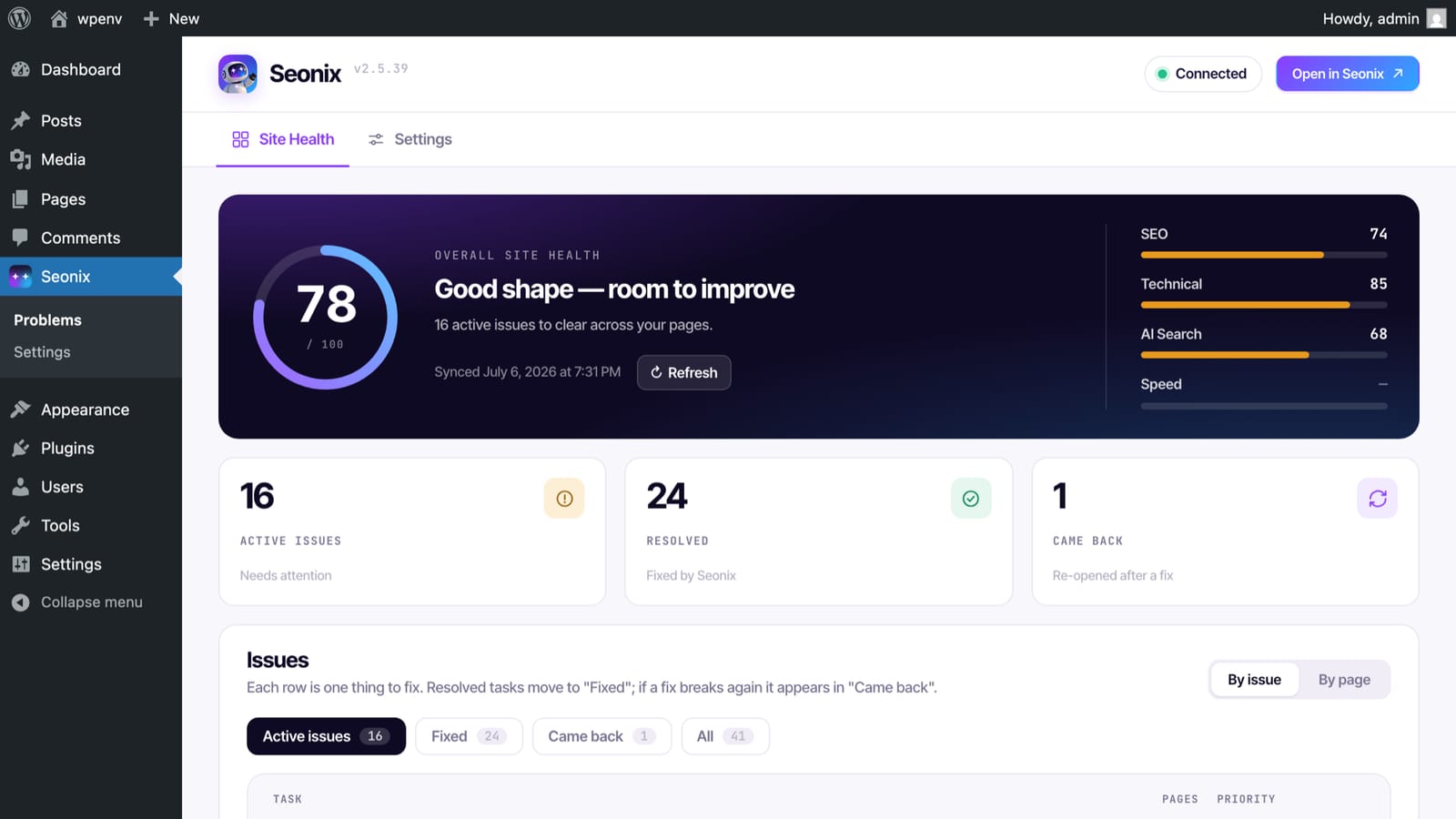
Site Health audit inside wp-admin
Your site's SEO audit arrives as a task list in WordPress: overall score, per-pillar breakdowns, and every issue explained — what it means, why it matters, how to fix it.
One-click SEO fixes with rollback
On paid plans, common technical findings get AI-suggested fixes you apply directly from WordPress or the Seonix dashboard — and roll back if you change your mind.
Works alongside your existing SEO plugin
Seonix writes SEO titles and descriptions into your SEO plugin's own storage and syncs your edits back to the dashboard. Run no SEO plugin at all? Seonix renders the meta tags itself.
Structured data and WooCommerce awareness
Articles published through Seonix carry JSON-LD structured data, emitted carefully so it never collides with schema your SEO plugin already outputs. WooCommerce products flow into the AI context for relevant internal linking.
Looking for the plugin itself?
This page covers the full SEO operation on WordPress. The free Seonix plugin — features, install steps, and what works without an account — has its own page.
Frequently asked questions
Do I need the Seonix plugin to publish to WordPress?
Will Seonix conflict with the SEO plugin I already use?
Can I review every article before it appears on my site?
What exactly does a published article include?
How much does WordPress SEO automation cost?
Can I automate SEO for more than one WordPress site?
How fast will automated SEO show results?
Does this help my site show up in ChatGPT and other AI answers?
Free site analysis
Put your WordPress SEO on autopilot
Start with the free analysis — Seonix studies your business, finds your keywords, and shows the content plan it would run before you pay anything.