
 official wordpress plugin · free
Rank on Google. Get cited by AI.
The Seonix plugin connects WordPress to an AI growth agent: it audits your site, fixes issues in one click, writes articles in your voice, and publishes on a schedule — so you show up in Google and in answers from ChatGPT and Gemini.
 Seonix · Site Health
Every SEO plugin gives you a checklist. Seonix does the work
A traditional SEO plugin points at problems and hands you a to-do list — you still research, write, and fix everything by hand. Seonix closes the loop: the AI agent does each step and shows you the result.
- Flags issues — you fix each one by hand
- Scores your text — you rewrite it yourself
- Suggests keywords — you write the articles
- Shows a report — you decide what happens next
- Fixes common issues in one click, with rollback
- Writes SEO-tuned articles in your site's voice
- Plans and publishes on a schedule you set
- Keeps auditing and improving around the clock
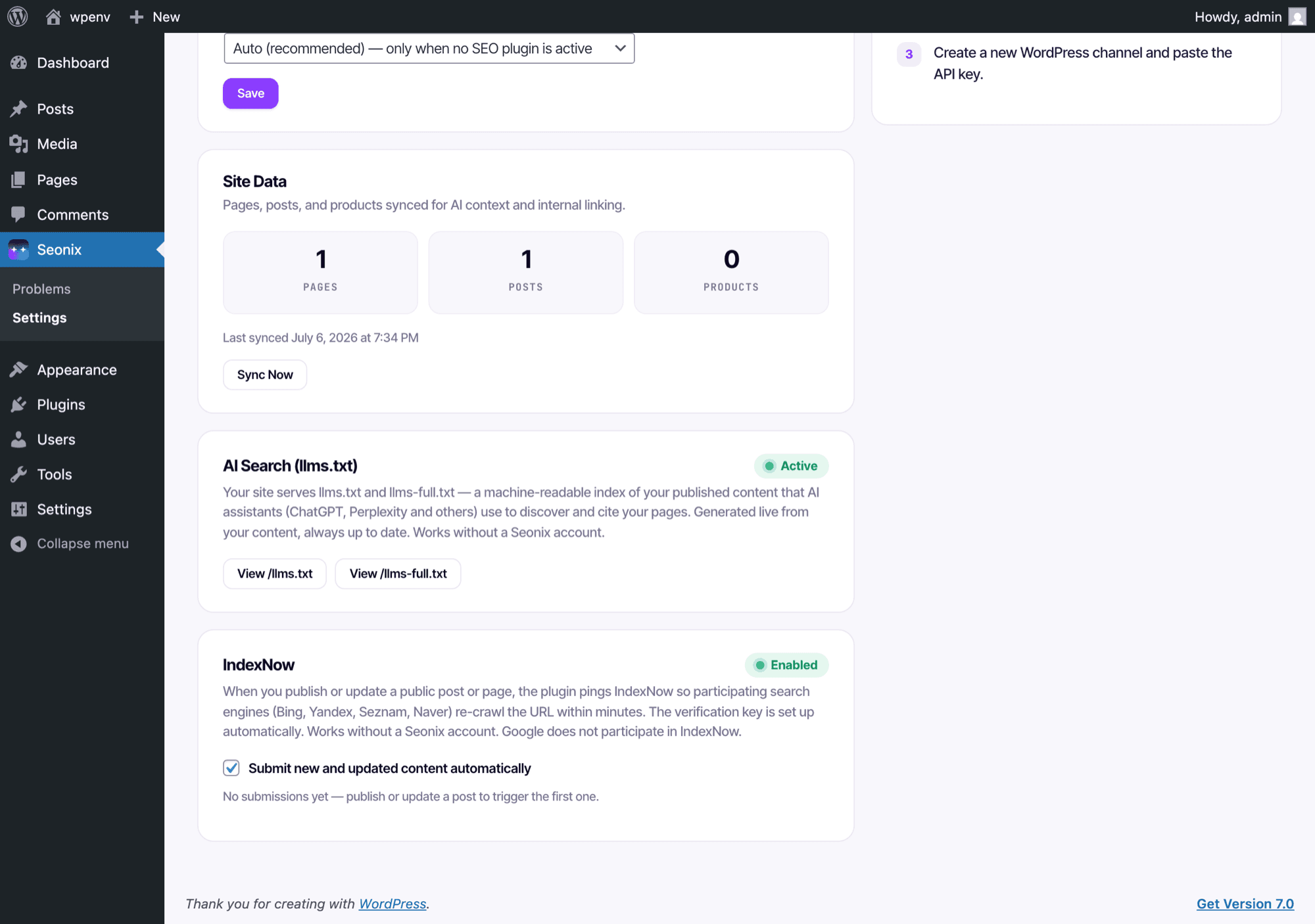
Two features go live the moment you activate
Install, activate, done. These work for free with no Seonix account — your site starts speaking to AI search engines right away.
llms.txt for AI search
Your site serves a live, always-in-sync index of your content that AI assistants read to discover and cite your pages — ordered by importance, generated on the fly.
IndexNow auto-submit
Publish or update a post and participating engines — Bing, Yandex, Seznam, Naver — re-crawl the changed URL within minutes. The verification key is provisioned automatically.
Audit → fix → research → publish. On repeat.
Four jobs a marketing team does by hand — running continuously, with every result visible in WordPress and in your Seonix dashboard.
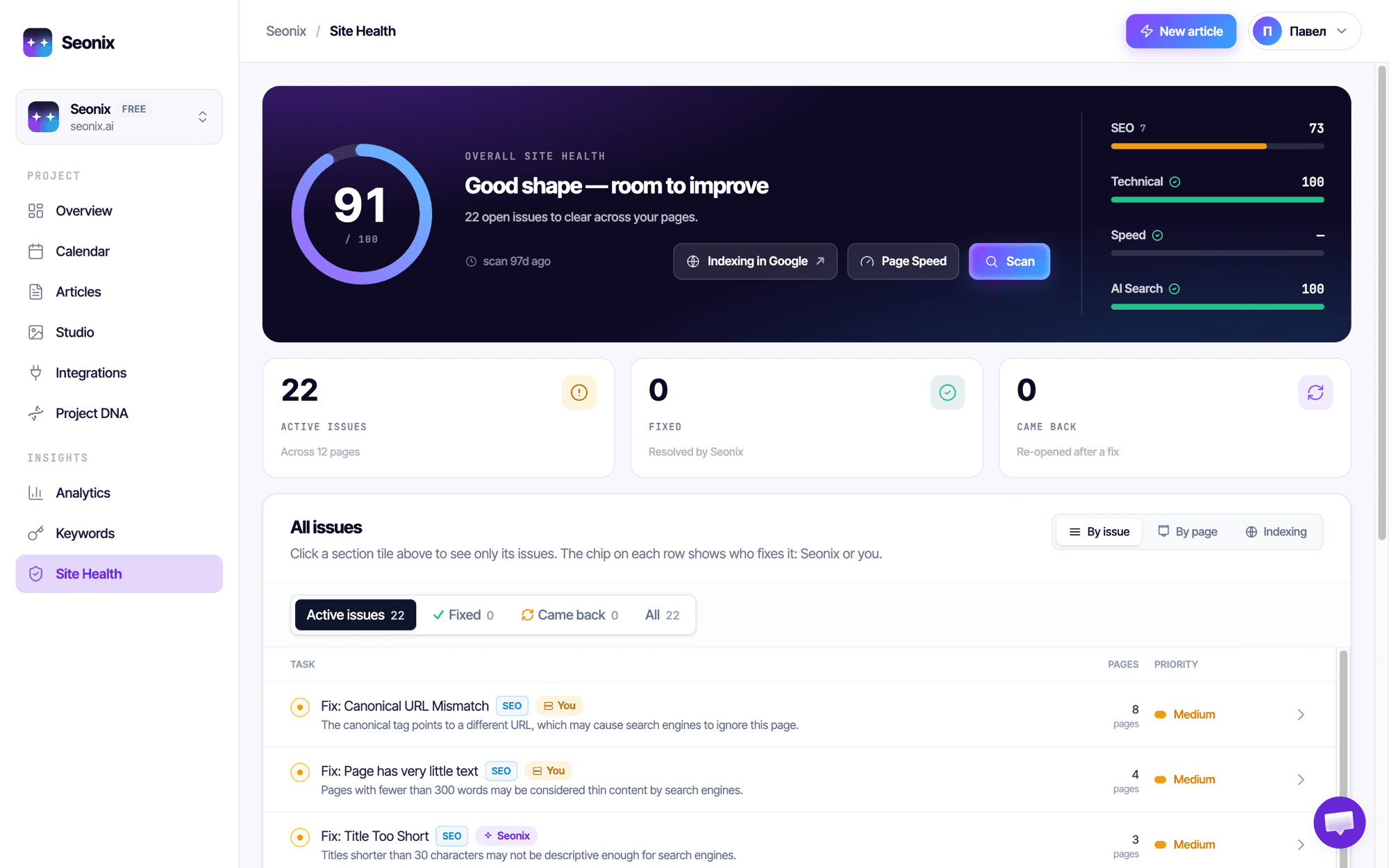
It audits every page of your site
Seonix scans your site and turns what it finds into one score with four pillars — SEO, Technical, Speed, and AI Search. Every issue is explained in plain language: what it means, why it matters, how to fix it.
- Broken links, thin content, missing meta, schema gaps and dozens more checks
- Each task is labeled with who fixes it: Seonix or you
- Re-scans keep the picture current — fixed issues that break again come back as “Came back”
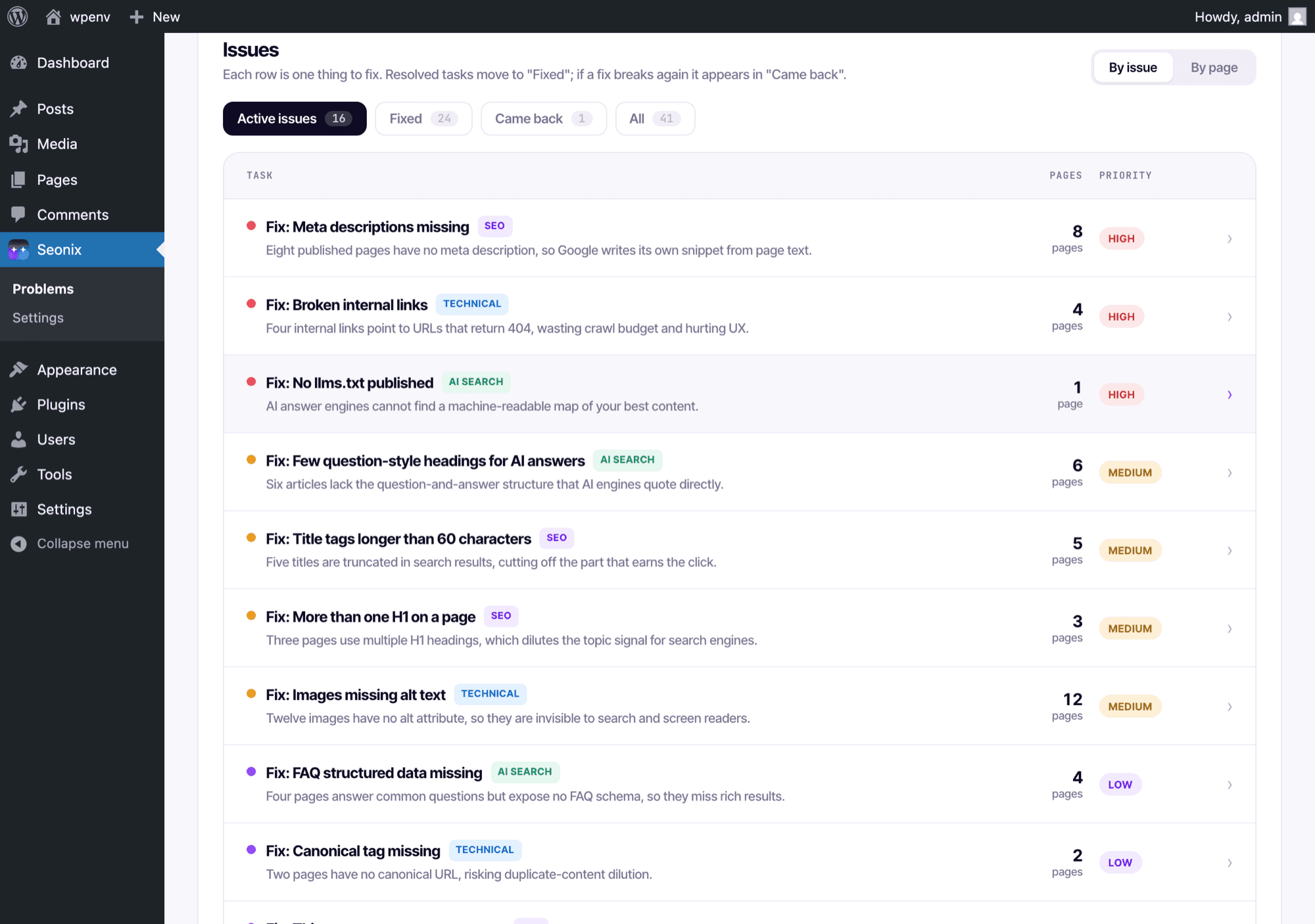
It fixes issues in one click — right in WordPress
The same audit lives inside your WordPress admin. Fixable issues — titles, meta descriptions, image alt text, broken links and more — apply through the plugin with one click, and every change can be rolled back.
- One-click fixes with full rollback history
- Built-in redirect manager: 301/302/307/308/410, pattern rules, single-hop chains
- 404 monitor that separates real broken links from scanner and bot noise
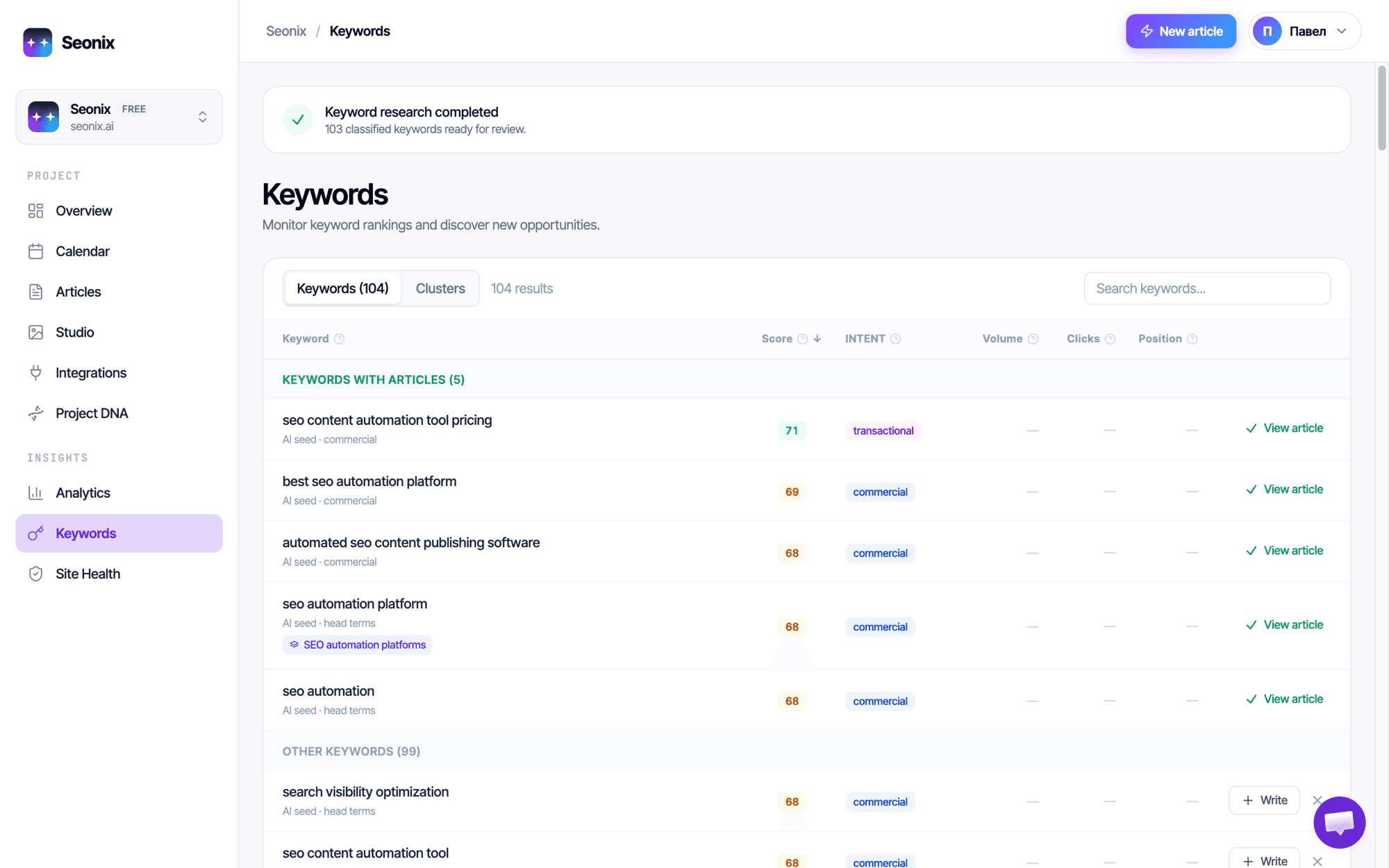
It finds the queries your customers actually type
Seonix researches your niche and classifies real search queries by intent and score — then turns the best ones into a content plan. No spreadsheets, no keyword-tool subscription.
- Keyword research runs automatically from your site's DNA
- Every keyword is scored and labeled: commercial, transactional, informational
- One click from keyword to a full article assignment
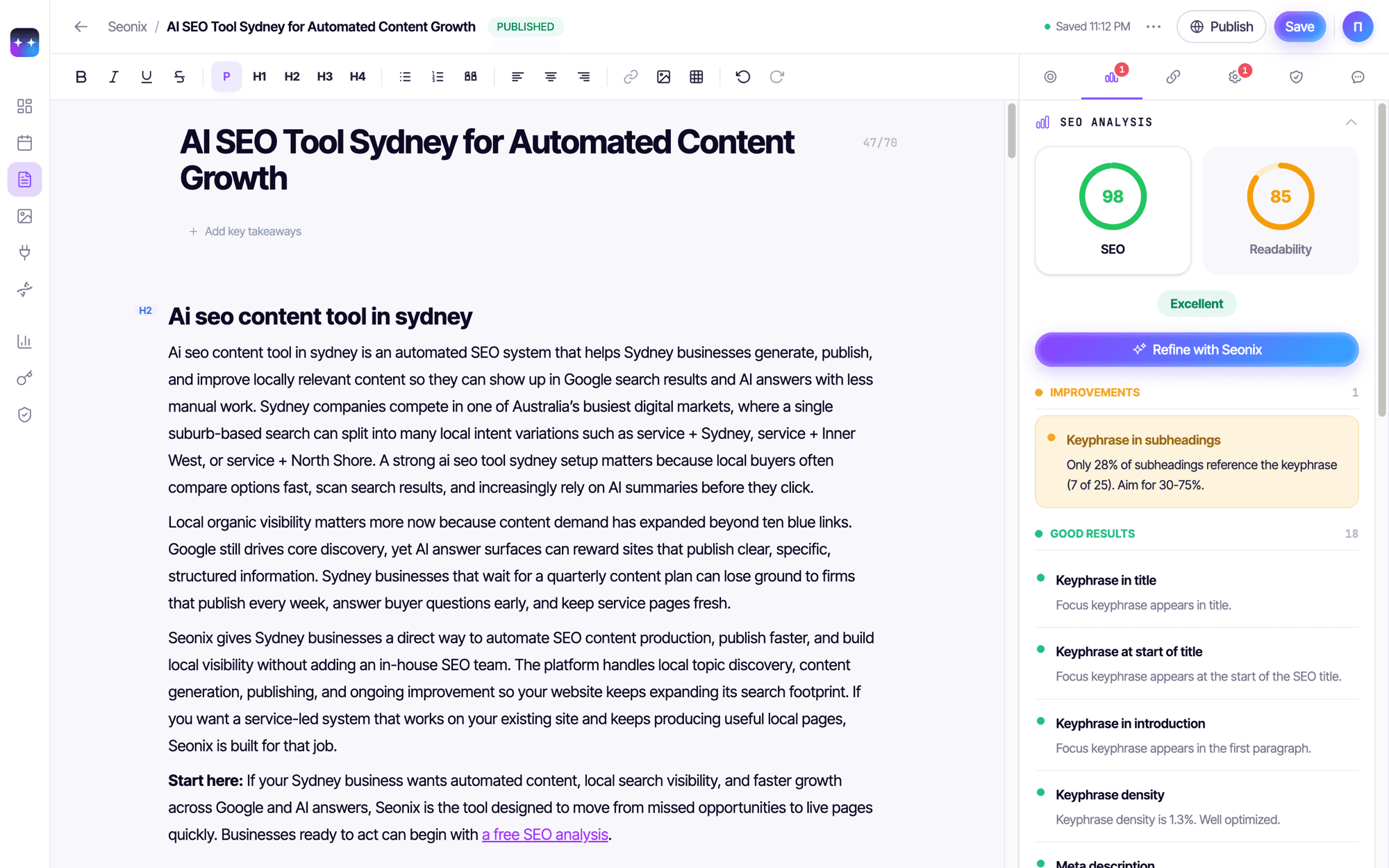
It writes, scores and publishes — in your voice
Articles are generated from your site's profile — audience, tone, topics — with titles, meta, internal links, headings and schema in place. Each draft carries live SEO and readability scores with the exact checks behind them, and publishes straight to WordPress.
- SEO and readability scored before you ever hit publish
- Internal links point at your real pages — including WooCommerce products
- Draft mode for approval, or full autopilot on a cadence you set. Pause anytime
Already run an SEO plugin? Keep it.
Seonix is not another meta-tags plugin — it works with whatever your site already uses.
Writes into your SEO plugin's own storage
SEO titles and descriptions land in your existing SEO plugin's native fields, and edits you make there sync back to Seonix. You keep editing where you always did.
No SEO plugin? No problem
Seonix renders titles, meta and social tags itself — and hands everything over automatically the day you install one.
Structured data without duplication
Article, FAQ, How-To and LocalBusiness markup is added only when no other plugin already outputs schema — no duplicate markup, no conflicts.
Live in about two minutes
Create a free account
Sign up at seonix.ai — the free plan includes a full site audit and Site Health monitoring.
Install the plugin
In your admin go to Plugins → Add New and search for Seonix — or upload the .zip.
Activate
Click Activate and the Seonix tab appears in your admin menu.
Connect
Open the Seonix tab and connect in one click, or paste the token from your dashboard.
100% automation of the SEO process
The plugin is the connection. Seonix is the engine — it watches, writes, and optimizes around the clock.
- Analyzes your visibility in search and AI
- Finds where you are losing customers
- Generates content for real user queries
- Optimizes pages for Google and AI
- Builds your brand's presence in AI answers
- Tracks changes and keeps improving results
What's inside
14 modules working on your visibility
Every module runs automatically on every project. No setup and no checklists — the autopilot decides what your site needs next.
Technical SEO Audit
Crawls your site the way Google does: sitemap, robots.txt, broken links, duplicates, on-page issues.
Prioritized fix listKeyword Research
Finds the queries your customers actually type and picks the ones you can win — with real search volumes.
Ready-to-use keyword listSEO Content Writing
Writes articles for those queries in your brand voice — with images, structure, and facts about your business.
Publish-ready articlesOn-page Optimization
Scores every article against strict SEO checks — keyword usage, structure, readability — and refines it until it passes.
Green SEO scoreSchema & Rich Results
Adds structured data so search engines can show rich snippets: articles, FAQs, your business profile.
Rich results markupMeta Tags & Covers
Generates titles, descriptions, and social-preview covers that earn the click in search and when shared.
Click-optimized snippetsSearch Console & GA4
Connects Google Search Console and GA4 to track positions, clicks, and the articles that bring customers.
Live ranking reportsSite Speed
Speeds up WordPress sites with image optimization, critical CSS, and caching — better Core Web Vitals.
Faster page loadsAI Visibility Tracking
Scans show where your brand appears in ChatGPT answers to the questions your customers ask.
AI mention reportsAI-Ready Content
Structures every article the way AI engines quote: direct answers, FAQ blocks, clear facts.
Content AI can citeAI Crawler Access
Keeps your site readable for AI engines, including an llms.txt map of your most important pages.
AI-readable site mapBrand Knowledge Profile
Teaches search and AI engines who you are: what you sell, where you operate, why you can be trusted.
Consistent brand factsCompetitor Analysis
Sees who wins your target queries today and finds the gaps where you can take their place.
Gap opportunitiesContent Refresh
Finds articles that lose positions over time and rewrites them until the SEO score recovers.
Refreshed pagesBuilt for owners who want traffic, not homework
Bloggers & content sites
Fill your blog with a steady stream of optimized articles without hiring writers.
Local businesses
Show up in Google and AI answers near you, with LocalBusiness markup handled for you.
Online stores
WooCommerce products feed the content engine, so posts link straight to what you sell.
Agencies & freelancers
Run audits, one-click fixes and publishing across client sites from one place.
Busy founders
No time for SEO? The agent audits, writes and publishes while you run the business.
Any WordPress site
If it runs WordPress, Seonix can audit it, fix it and grow it — no technical setup.
Before you install
Do I need a paid plan to use the plugin?
No. llms.txt and IndexNow work free the moment you activate, with no account at all. Connect a free Seonix account and you also get the full site audit, Site Health inside WordPress, and live content scores. AI articles, one-click fixes and autonomous publishing are on paid plans — from $49/mo instead of $100, cancel anytime.
Will Google penalize AI-written content?
Google's own guidance is that appropriate use of AI or automation is not against its rules — what it rewards is quality, however the content is produced. That is exactly what Seonix optimizes for: articles are written from your site's real profile and audience, scored for SEO and readability before publishing, and you can review every draft before it goes live.
Do I stay in control of what gets published?
Always. Choose draft mode — Seonix writes, you approve — or full autopilot on a cadence you set (daily to weekly). You can pause the agent at any moment, edit any article before or after publishing, and roll back any applied fix.
Will it conflict with my current SEO setup?
No. Seonix detects your active SEO plugin and writes SEO titles and descriptions into its own native storage, then syncs your edits back — so you keep working exactly where you always did. If you run no SEO plugin, Seonix renders the meta tags itself and hands them over the day you install one.
How does it work in practice?
You add your site and Seonix analyzes it: business, audience, tone, topics. It then audits every page, researches keywords, builds a content plan, writes optimized articles, and publishes them straight to WordPress through this plugin. The full flow from idea to publish takes minutes, not hours.
I already have a site — can I connect it?
Of course. Seonix connects to WordPress via this plugin — and also to Ghost, Webflow, Shopify, and Wix, or any other site through the Custom API. Setup takes a few minutes, no technical knowledge required.
Does Seonix handle the technical details for Google?
Yes. Every article ships with proper heading structure, meta description, URL, internal links, image alt text and schema markup. The site-level audit covers indexing, redirects, broken links, duplicate content and AI-search readiness — with one-click fixes for the most common issues.
How is this better than a regular text generator?
Generators write text. Seonix runs the whole cycle: it audits your site, researches keywords, plans content, writes articles tuned to your voice, scores them, publishes on schedule, and keeps monitoring the results. A generator gives you words; Seonix gives you a growing site.
Start growing in Google and AI answers today
Without overpaying marketing agencies. Free plugin, free plan — your first audit is on us.